



The adoption of public cloud has been a growing trend in recent years; companies of all types and sizes have made the decision to migrate their local workloads to the cloud to take advantage of its benefits (elasticity, scalability, security, cost savings, etc.).
Making this decision is a complex issue involving many aspects, and proper planning is necessary for the process to be successful.
In this article I will tell you about the Google's recommended migration process to properly plan your journey to the cloud.
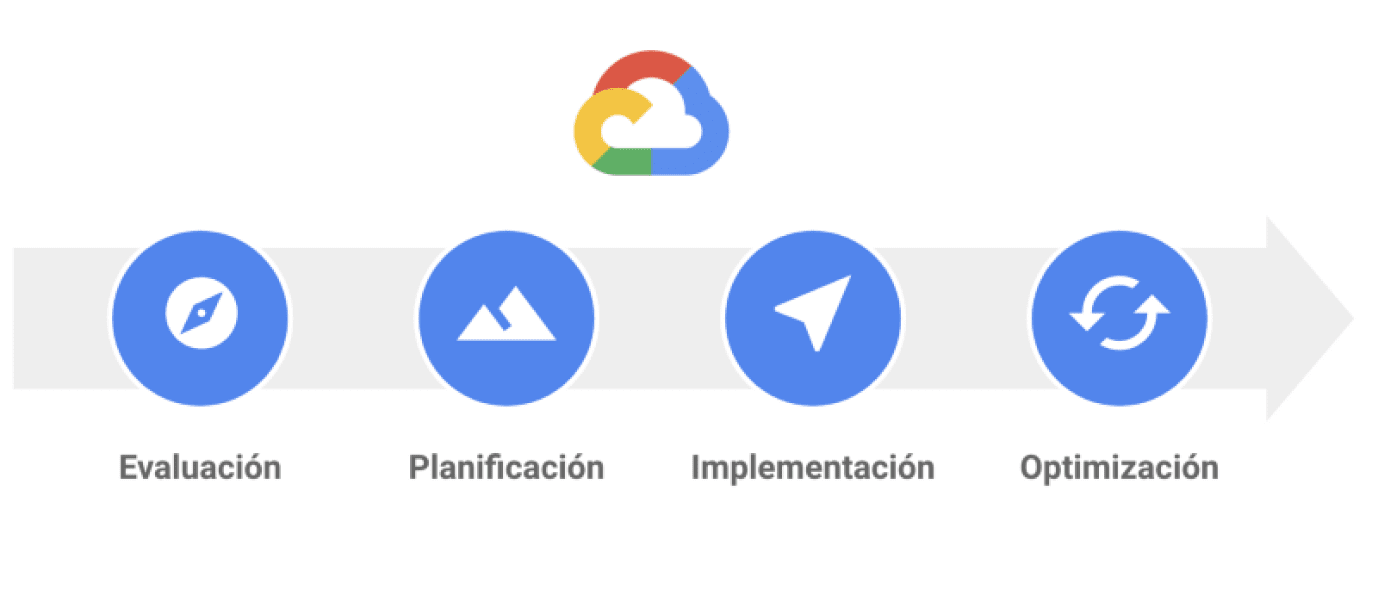
The migration process can be likened to a journey. You're at point A with your infrastructure and applications, and you want to get to point B. To get from A to B, you can choose different routes depending on your circumstances (time and budget). Google proposes carrying out the migration process in four phases: Assessment, Planning, Implementation, and Optimization.
Assessment
As a first step in the migration process, it's essential to understand the workloads and configurations of the various existing environments. When migrating a large number of workloads to the cloud, it's common to encounter legacy systems with little to no documentation. Therefore, it's crucial to inventory the infrastructure and workloads to be migrated (systems, databases, message brokers, data stores, and network devices).
The infrastructure inventory should contain information about the current servers and their specifications. Sometimes this process can be done manually, using a spreadsheet, for example. When dealing with virtualized infrastructure or infrastructure in other clouds, tools like Stratozone can be used, which allows for automatic infrastructure inventory generation using an agent deployed on the source infrastructure.

Example of a Server Inventory
In addition to the infrastructure, it is extremely important to identify the workloads that are operating in the current scenario and to know the dependencies and restrictions that each of them has.

Example of an App Inventory
With this in mind, we can create a matrix to organize workloads into categories, based on their complexity and the risk of migrating them to Google Cloud.
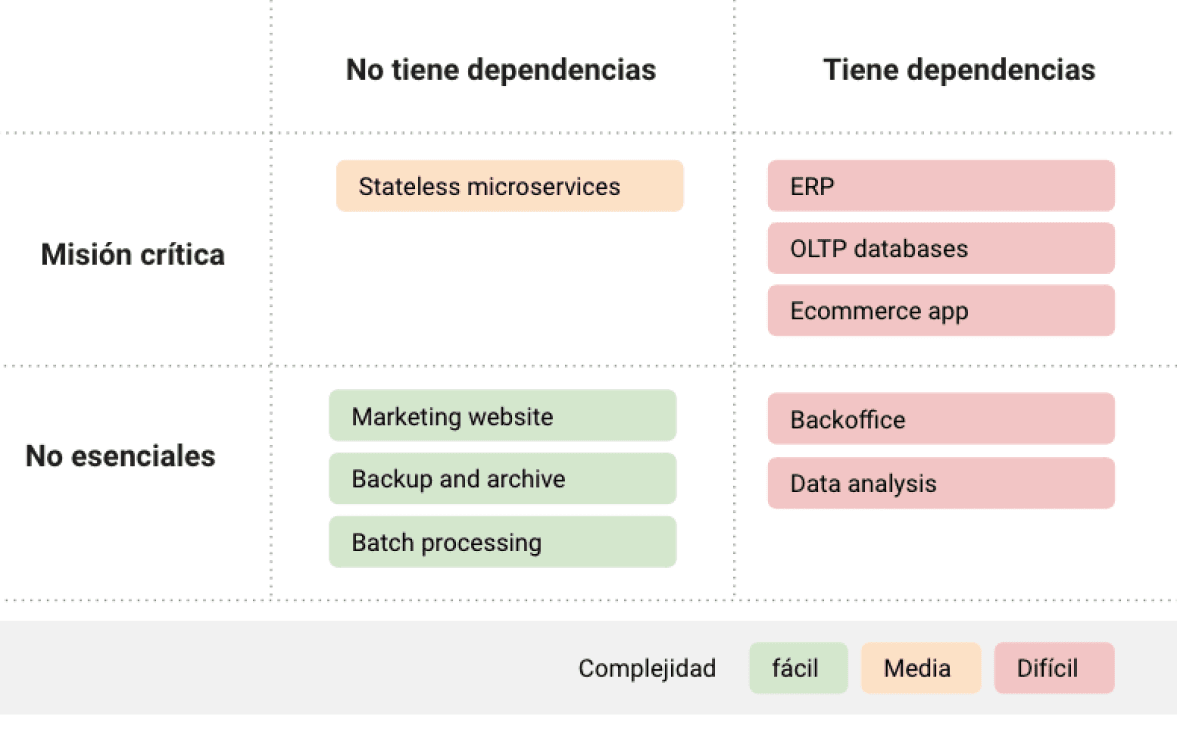
In this example matrix, there are two dimensions of the evaluation criteria. Your workloads may require more dimensions or additional considerations.
This way, we can identify the workloads that are candidates for migration first. You can choose just one or include many more in the migration backlog. Migrating workloads first allows your teams to run and test the cloud environment, focusing on the migration process rather than its complexity. Starting with less complex workloads reduces initial risk because you can then apply your team's newfound knowledge to more challenging workloads.
The assessment phase allows us to identify workload dependencies and requirements, perform total cost of ownership calculations, and establish an initial basis for defining the cloud services we will use.
Planning
The operational foundations of the cloud must be established to allow for flexible and secure scaling as we incorporate workloads into the new environment. To achieve this, it is necessary to keep in mind that cloud operations are an evolutionary process that requires time and maturity from the management teams. Therefore, when establishing the rules, administration, and configuration of the environment, space must be left for subsequent changes.
To plan your migration, you must do the following:
• Establish user and service identity management.
• Design the organization of resources.
• Define groups and roles for access to resources.
• Design the network topology and establish connectivity.
• Establish a clear policy on cost management and transparency.
Implementation
Migration processes are complex; there are several factors to consider when deciding which path to take for our workloads.
The following are the main types of migrations we can choose for our workloads: Lift-and-shift, Improve-and-move and remove-and-place.
• Lift-and-shift
In a migration with zero or few modifications and refactorings, the changes you make to the workloads being migrated are the minimum necessary for them to function in the target environment. This migration approach allows for rapid migrations but doesn't allow you to take advantage of native cloud features.
If you wish to perform a lift-and-shift migration, you can use Migrate to Virtual Machines (Migrate for Compute Engine) A Google Cloud service that allows you to quickly replicate VMs to Google Cloud, from a local environment or other clouds such as AWS or Azure.
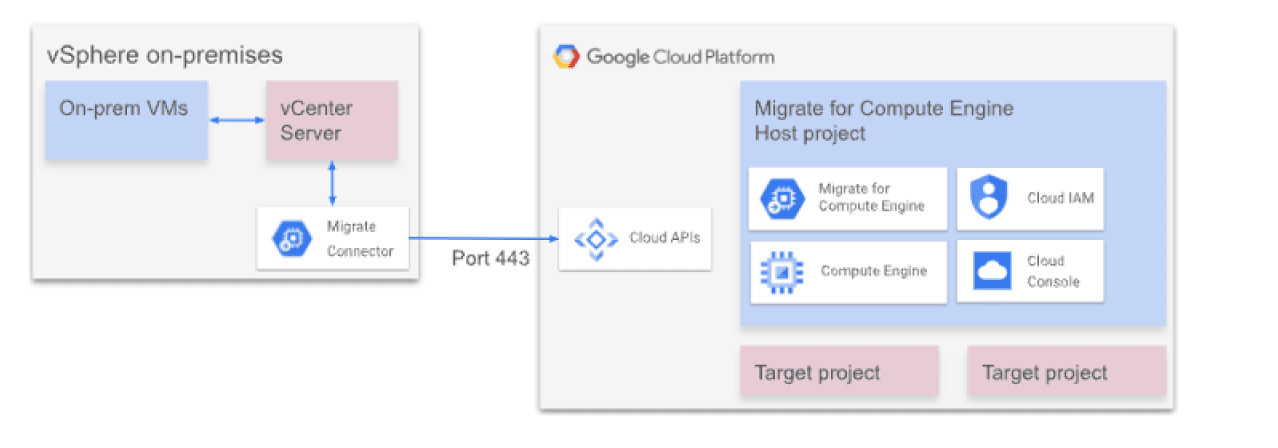
Migrate to Virtual Machines Architecture
• Improve-and-move
This type of migration requires upgrading or modernizing workloads in order to take advantage of native cloud capabilities (improving based on performance, cost, or user experience).
On the other hand, this migration style takes longer than lift-and-shift migrations, as it requires refactoring to deploy workloads in the cloud environment. The additional time and effort required for this process must be evaluated.
Application refactoring requires mastery of different skills and practices, such as application containerization, business service orientation, continuous integration and delivery (CI/CD) pipelines, application understanding and decoupling, among others.
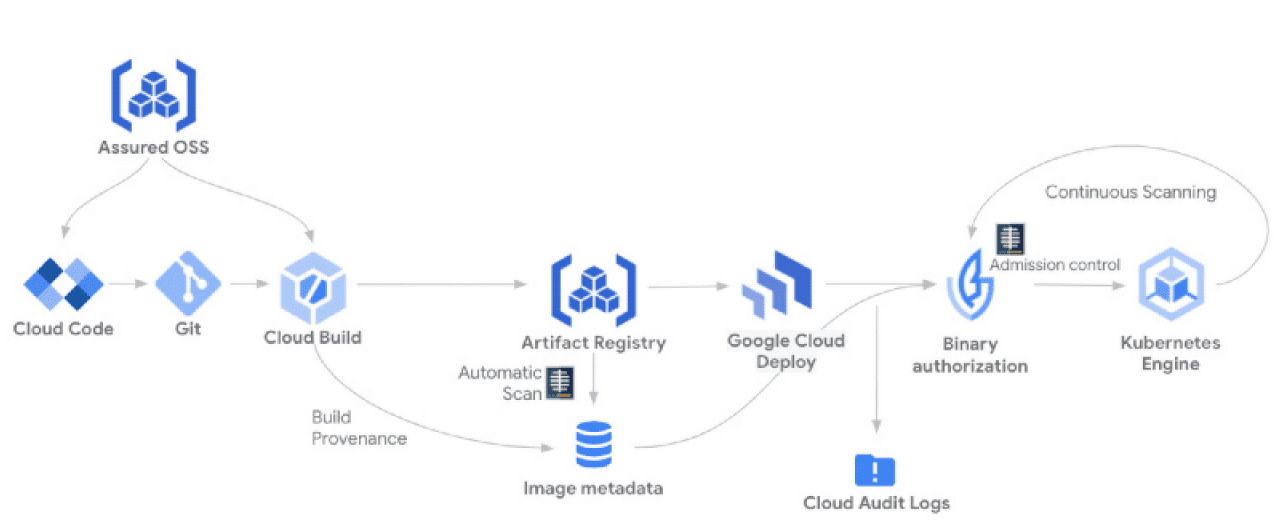
Continuous Integration and Continuous Delivery (CI/CD) Pipeline in Google Cloud
• Remove-and-place
This approach involves removing a workload and completely redesigning and rewriting it as a cloud-native application.
If your current workload is too expensive to migrate using one of the approaches mentioned above, or if licensing or compliance restrictions prevent it from being supported in Google Cloud, you can perform this type of migration.
Remove-and.replace allows you to take full advantage of Google Cloud features such as horizontal scalability, highly managed services, and high availability; it is also a good opportunity to remove technical debt from the existing legacy version.
However, they can take longer than the types of migrations mentioned above. Regardless of the path you choose to migrate your workloads, you need to keep in mind how much automation and flexibility you require.
• Completely manual migrations.
• Configuration management tools.
• Automation of implementation.
• Infrastructure as code.
Optimization
After migrating your workloads and getting your team up and running with Google Cloud, you can start optimizing your environment:
• Keep your development and operations team continuously trained
• Improve the observability of systems that are in production to ensure that everything in your environment works as expected, improving practices and processes.
• Automate everything, as it reduces risk, lowers costs, and saves time. Teams also become more efficient because they don't have to put effort into repetitive tasks.
• By coding everything through the implementation of infrastructure processes as code and policy as code, you can make your environment fully auditable and repeatable.
• Have a test-driven development approach.
• Use managed services instead of self-managed ones.
• Optimize performance and scalability; you can reinforce existing resources, add more when needed, and remove unnecessary resources in a scalable manner.
• Reduce costs by analyzing your billing reports to study spending trends and determine which Google Cloud products you use most frequently.
The optimization phase should be considered a continuous phase that allows for the improvement and security of cloud implementations, as new capabilities are incorporated into the organization.
Do you have more questions about migrating to Google Cloud? Don't worry, at Zenta Group we have experts who can guide you and lead you on a successful journey, with high benefits for your business.